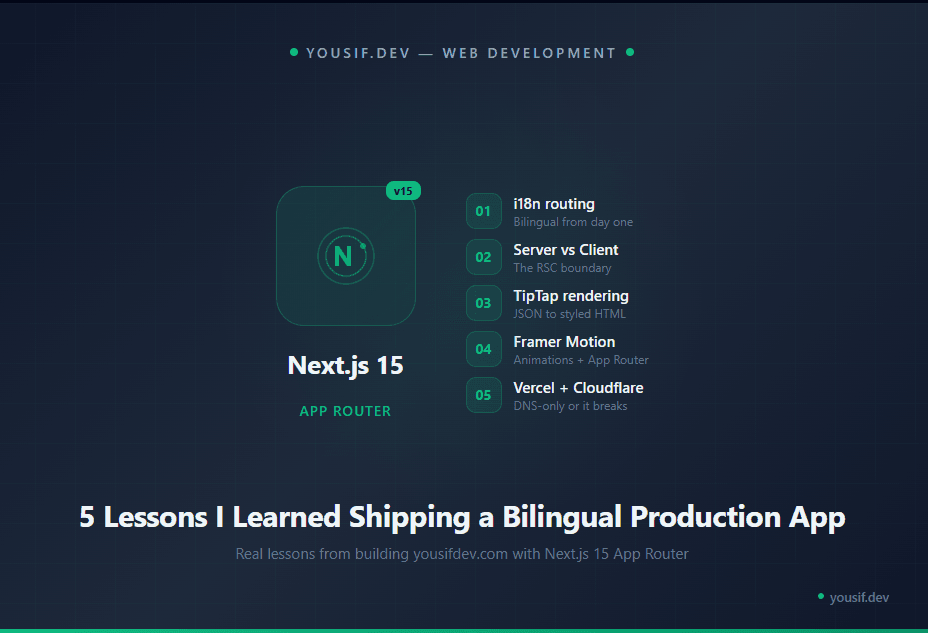
Next.js 15 App Router: 5 Lessons I Learned Shipping a Bilingual Production App
Real lessons from building yousifdev.com — i18n routing, Server vs Client Components, TipTap rendering, Framer Motion gotchas, and deploying on Vercel with Cloudflare.
I didn't learn these from a tutorial. I learned them from shipping.
My platform — yousifdev.com — is a bilingual (English/Arabic) content platform built with Next.js 15 App Router, Supabase, Tailwind CSS 4, and Framer Motion. Deployed on Vercel with Cloudflare DNS.
Along the way, I ran into problems that no documentation warned me about. Here are the five lessons I wish someone had told me before I started.
Lesson 1: i18n Routing Is Simpler Than You Think
I expected internationalization to be painful. It wasn't — once I understood the pattern.
The setup is a [locale] dynamic segment at the root of your app directory. Every route lives inside app/[locale]/(public)/.... Middleware detects the user's preferred language and redirects to /en/... or /ar/... automatically.
I used next-intl which handles message files, locale detection, and the useTranslations() hook beautifully. Two JSON files — messages/en.json and messages/ar.json — and your UI speaks both languages.
The gotcha: Every internal link must include the locale prefix. If you forget and link to /blog instead of /en/blog, the middleware redirects and you get a flash. Use next-intl's navigation helpers and this goes away.
Add i18n from day one. Retrofitting it into an existing app means touching every single link, every layout, and every data-fetching function.
Lesson 2: Server Components by Default — Client Components by Exception
This is the biggest mental model shift in App Router. In the old Pages Router, everything was client-side by default. Now it's reversed — everything is a Server Component unless you explicitly opt out.
In practice, this means your page-level components fetch data directly on the server. No useEffect, no loading spinners for initial data, no client-side fetch waterfalls. The HTML arrives fully rendered.
You only add 'use client' when you need browser APIs: form state, click handlers, Framer Motion animations, or the TipTap editor.
The gotcha: You can't pass non-serializable props from a Server Component to a Client Component. I learned this the hard way trying to pass Lucide icon components as props. Functions, class instances, and React components can't cross the RSC boundary. Pass strings or plain objects instead, and let the Client Component import the icons it needs.
Think of Server Components as the data layer and Client Components as the interaction layer. Keep the boundary clean and your app stays fast.
Lesson 3: TipTap JSON to HTML Is Not as Simple as It Sounds
I store all article content as TipTap JSON in Supabase JSONB columns. The admin writes in a TipTap editor, the JSON gets saved, and the public page renders it to HTML using generateHTML() from @tiptap/html.
Sounds simple. Here's where it breaks:
Your renderer's extensions must exactly mirror your editor's extensions. If the editor uses CodeBlockLowlight but the renderer uses the basic CodeBlock from StarterKit, the JSON contains attributes the renderer doesn't understand — and it silently fails or renders garbage.
Styling is a separate battle. I initially relied on Tailwind's prose-* modifier classes to style the rendered HTML. In Tailwind CSS 4, many of these modifiers don't compile properly. The fix was to add CSS classes directly via TipTap's HTMLAttributes option on each extension — so the generated HTML arrives pre-styled.
Keep your editor and renderer in sync. When you add an extension to the editor, add it to the renderer at the same time — or the output will silently break.
Lesson 4: Framer Motion and App Router Have a Complicated Relationship
Framer Motion is a Client Component library. Every component that uses motion.div or AnimatePresence needs 'use client' at the top. That's fine — but it has consequences.
If your page component uses Framer Motion directly, the entire page becomes a Client Component — and you lose server-side data fetching. The page now needs useEffect and loading states instead of just returning data from the server.
The solution: Create thin wrapper components. Your page stays as a Server Component that fetches data. It passes the data down to a Client Component wrapper that handles the animation. The page is fast, the data is server-rendered, and the animation still works.
Layout animations across route changes — the kind that worked beautifully in Pages Router — don't work the same way in App Router. Each route is a separate React tree. If you need page transitions, you'll need a template component or a custom solution.
Keep animations in small, focused Client Components. Don't let Framer Motion infect your page-level Server Components.
Lesson 5: Vercel + Cloudflare DNS = One Setting You Must Get Right
I use Cloudflare as my domain registrar and DNS provider, with Vercel hosting the Next.js app. This is a common setup — but there's one critical setting that breaks everything if you get it wrong.
Set your DNS records to DNS-only mode, not Proxied. In Cloudflare, the default for new records is "Proxied" (orange cloud icon). This routes traffic through Cloudflare's network — which conflicts with Vercel's SSL and edge network. The result: SSL handshake errors, redirect loops, or your site simply not loading.
Click the orange cloud to turn it gray (DNS-only). That's it. Vercel handles SSL, caching, and edge delivery on its own.
Two more things to update:
Environment variables — Set
NEXT_PUBLIC_SITE_URLto your production domain in Vercel. If it still points tolocalhost:3000or a preview URL, your OG images, canonical URLs, and sitemap will all be wrong.Supabase Auth URLs — Update the redirect URLs in your Supabase dashboard to include your custom domain. If you only have
localhostlisted, admin login will fail in production with a redirect mismatch error.
DNS-only mode in Cloudflare. Production URL in environment variables. Auth redirects updated. Miss any one of these and your deployment breaks silently.
What I'd Do Differently
If I started this project over, one thing would change: I'd set up i18n from the very first commit. Adding bilingual support after the app was already built meant touching every layout, every navigation link, every data query, and every SEO tag. It worked, but it was a week of refactoring that could have been a few hours of setup at the start.
Everything else — Supabase, TipTap, Framer Motion, Vercel — I'd pick again. The stack is solid. The lessons above are the rough edges, not deal-breakers.
Ship something real. That's where the lessons live.